A Telescope picker for ZTL
Navigating a set of notes is central for a useful note taking system. I recently designed a custom note picker for ZTL and aplied ideas of modal editing to its function.
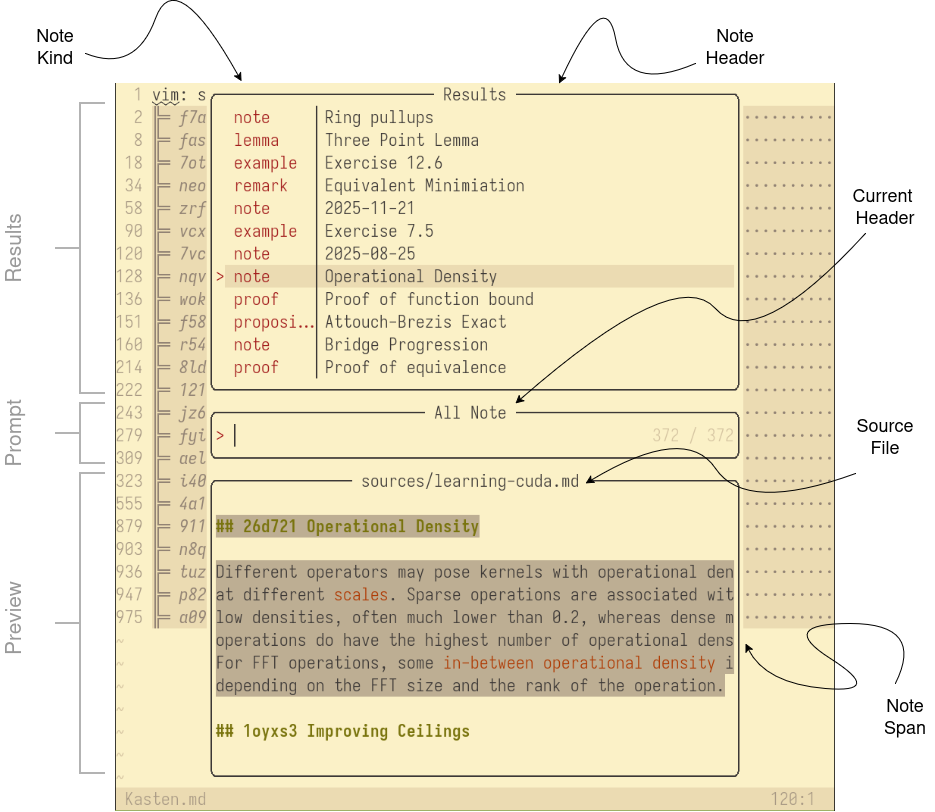
The Telescope picker 1 displays references associated with one note, a note list or all notes in the ZTL repository. It packs a lot of information in a small area, provides a result window for displaying list of potential notes, a window for entering a prompt, to further subselect results, and a preview window for viewing information associated with the note. As the notes are generated from either Markdown, LaTeX or BibTeX (see last post), notes do have a type and of course an associated header.
Telescope provides a template to rapidly develope different forms of pickers. Their examples showcases among others file pickers, Git commit pickers, etc.
For example, the overlay looks like this when querying all available notes:
Similar to Ariadne’s thread the picker allows following
a chain of notes, until the desired one is located. Moving along
the chain is easy done with the <Plug>ZtlFollow and
<Plug>ZtlRetreat keymaps 2. (normally associated with arrow keys)
I use the <Plug> Plugin Action syntax from ViM to
define custom keymaps and provide more context of their
function. See the :help using-<Plug> help page for
further information.
At each position we can show either incoming, outgoing links or
the history of a note. Incoming links include parent
note, and those referencing us, outgoing links include all
children notes and links contained in the note content. The
history of a note displays all commits in the Git history
associated with changes to either the note content or
header. Their associated keymaps are
<Plug>ZtlModeOutgoing, <Plug>ZtlModeIncoming and
<Plug>ZtlModeHistory.
For outgoing and history modes (incoming looks the same with different arrows), the results window looks like this:

Following a commit in the repository brings up all notes changed in that specific instance. I also borrowed the Git commit previewer from the Telescope repository to show change date, commit message and changed files with syntax highlighting.
Modal editing and actions depending on the initial mode
This becomes more powerful, when combining with the modal editing approach of ViM to create custom actions for a selected note.
In ViM jargon we support currently actions based on either the insert mode, visual mode or normal mode. For normal mode, we open selected note in current window, for insert mode, we paste a new link at the current cursor position and jump to fill in the link text, for visual mode we replace the selected text with note. To give an example, here for visual mode:
Three previews for notes
Textual information is simple, we just display the range of
lines corresponding to a note. For showing the history of a
note, we parse the result of git log and display
associated commits, which changed a note.
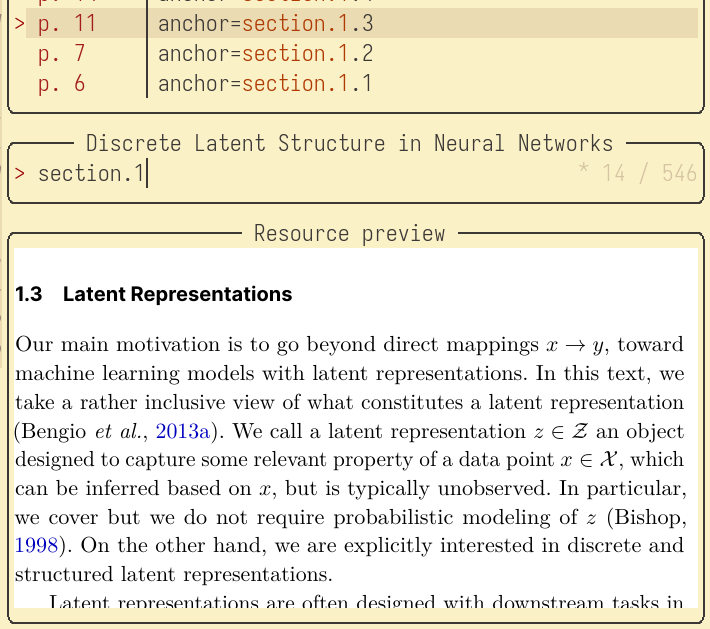
For resources, the task is a bit more involved. We have to
take a snapshot of the resource at a given view. For this, I
have written an auxilliary binary called ztl-res. It does
all the heavy work of search and rendering views into
snippets, ready to display to terminals.
That looks currently like this, and allows to include views in the generated links (with the help of SIXEL):
Conclusion
It is astonishing how rich the information is, you can be packed in a pure textual information (plus some snippets) representation. The picker respresents all possible interactions with the set of notes.
That’s all for now :) Next time I will write about scheduling in the ZTL system and managing long running cycles.